MLBB Server and Region: How to Change Location the Right Way
By Sir Ayup 5 October 2026, 21:00 WIB
This guide separates the three, walks through the official way to change location, and explains what a VPN or location spoofer really changes, and what it costs if it goes wrong.
Server, Region and Location Are Three Different Things in MLBB
Most confusion about MLBB servers comes from one word covering three separate systems:
- Server ID (Zone ID): the short number shown in brackets after your player ID on your profile, for example 123456789 (1234). It is assigned when the account is created and stays with the account. Top-up services ask for it together with your player ID so diamonds land on the right account.
- Matchmaking region: the pool of players you are matched with. It is decided by where your connection comes from, which is why players in the same country usually meet each other and why ping matters so much.
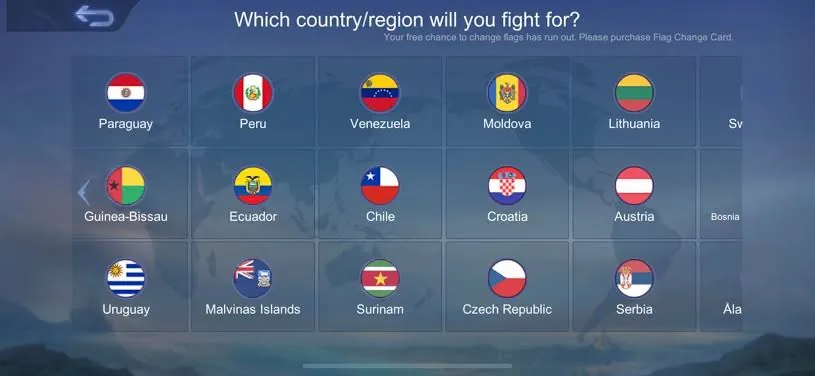
- Location: the place used for local leaderboards and hero titles, such as the rankings for your area, province or country. This is the one setting the game lets you change.
When people search for an "Indo server" or ask how to move to another country's server, they usually mean one of the last two. Neither requires touching the Server ID, which cannot be changed anyway.
How to Change Location in MLBB the Official Way
The game uses your device's location to place you on local leaderboards, and it offers a built-in way to update it. The steps follow the same pattern on Android and iOS:
- Turn on location services on your phone and allow Mobile Legends to use your location.
- Open the Leaderboards from the main screen.
- Switch to the local rankings tab, the one that shows players near you.
- Tap the location shown at the top and confirm the update to your current position.
The key limit is time: you can change location roughly once every 7 days, so it pays to update it when you actually are where you want to compete, rather than changing it on a whim and getting locked in for a week. Local rankings are recalculated on a regular cycle, usually weekly, so a new location takes effect on your titles at the next update rather than instantly.
Where you set your location changes who you are compared against. A crowded city means more competition for local hero titles, while a quieter area can be easier to top. Because titles are earned with specific heroes in ranked matches, the heroes you choose matter as much as the place, and picking from the strongest options in the current MLBB hero tier list gives you a better shot at the higher title levels.
Why You Cannot Change Your MLBB Server ID
The Server ID is part of how the game identifies your account, not a setting you pick. There is no in-game option to move an existing account to a different Server ID, and changing location or region does not alter it. That is also why top-up sellers always ask for both numbers: the pair points to exactly one account.
This matters for anyone hoping to "switch to the Indo server" or another country's server. There is no separate server to move into. Players in Indonesia are matched with each other because they connect from nearby, not because their accounts sit on an Indonesian server. If you live elsewhere, the realistic options are to play from where you are or to play with friends abroad and accept higher ping.
What can change is everything around the account: your location for titles, the friends you queue with, and the rank you climb each season. None of these depend on the Server ID, so the start of a new season, like the one that arrived with the Season 42 Starward Decade update, is a better moment to rethink where you compete than any server workaround.
What Using a VPN in Mobile Legends Actually Does
A VPN changes the route your connection takes to the game's servers. It does not change your account's Server ID, and it does not change the location used for leaderboards, which comes from your device's location rather than your IP address. In practice, a VPN mainly changes two things:
- Ping: routing through another country almost always adds delay. In a game where skill timing decides fights, even a small increase is noticeable.
- Matchmaking pool: connecting from a different region can place you with players from that region, along with the ping that comes with it.
There are legitimate reasons people use a VPN, such as an unstable local route, but using one to chase easier matches or another region's rankings is a different matter. Moonton's rules prohibit using third-party tools to gain an unfair advantage, and accounts that look like they are manipulating matchmaking or rankings risk penalties.
Fake GPS apps carry more risk than a VPN. Spoofing your device location to grab a title in a region you are not in is exactly the kind of manipulation anti-cheat systems look for, and players have reported warnings and penalties for it. A hero title earned that way is not worth an account with years of skins and progress behind it.
What Happens When You Travel or Move Abroad
Moving to another country, or just travelling for a few weeks, is the one situation where your matchmaking region and location genuinely change, and it is worth knowing what follows you and what does not:
- Your account stays the same: Server ID, heroes, skins, rank and diamonds all come with you, because they belong to the account rather than the country.
- Your matches change: connecting from the new country places you with players there, usually with better ping than playing back into your home region.
- Your titles can follow you: once you update your location through the leaderboard, you start competing for local titles in the new area at the next ranking update.
- Your friends may feel far away: queuing with friends back home means playing on a route that is distant for at least one side, so expect higher ping in those matches.
For a short trip, it is often better not to change location at all, since the seven-day limit means you could still be listed in the travel destination after you are home. For a longer move, update it once you have settled and play from there.
How to Turn Off Location in Mobile Legends
If you simply do not want other players to see where you are, you do not need to disable anything at the system level. Mobile Legends has a privacy option for this:
- Tap the settings gear on the main screen.
- Open the Interface settings.
- Turn off the option to share your location.
This hides your location from other players' view of your profile. You may still see it on your own profile, which is normal. If you go further and deny the game location permission in your phone settings, you also give up the location-based features, so local leaderboards and the titles tied to them will not update for you until you turn it back on.
The Right Way to Handle Server and Region in MLBB
Put together, the rules are simple:
- Leave the Server ID alone; it cannot be changed and does not need to be.
- Change your location only through the leaderboard, and only when you are actually there, because the next change is about a week away.
- Hide your location with the in-game share setting if privacy is the concern, rather than turning off location entirely.
- Skip VPNs for ranked play: they raise ping and invite scrutiny without changing your account.
- Never use fake GPS to farm titles; the risk to the account outweighs any title.
Players who follow these rules keep their titles, their rank and their account safe, and still get to compete in the area they actually play from.
If the region you want is where your friends play rather than where you live, or your current account was built in a place you no longer compete in, starting fresh is often simpler than fighting the location rules. You can look at Mobile Legends Accounts with the heroes and skins you want already unlocked, hand the daily grind to an experienced player through Mobile Legends Hourly Services, or reach the rank you are aiming for this season with Mobile Legends Boosting.
GameMarket.gg is a trusted digital marketplace for everything gaming-related. We serve the gaming community by providing secure access that enhances every gaming journey.