How to Change Your Name in PUBG Mobile: Rename Card Guide
By Sir Ayup 12 October 2026, 17:00 WIB
How to change name in PUBG Mobile comes down to one item, the Rename Card, which you use from your inventory or from the edit icon next to your name on your profile. Your first card is free after you reach Level 10, and extra cards cost 180 UC in the shop or come from events and rewards. Each card is used up after one change, and you can only rename once per day, so pick the new name carefully.
This guide explains where to get Rename Cards, how to use one step by step, the rules your new name has to follow, and the errors you might see along the way.
What a Rename Card Is

A Rename Card is the only standard way to change your in-game name in PUBG Mobile. It is a single-use item: one card, one name change. Changing your name is purely cosmetic and does not touch your level, rank, inventory, friends list or match history.
Keep in mind that PUBG Mobile and the PC version of PUBG are separate games with separate accounts, so a name change in one does not carry over to the other.
How to Get a Rename Card
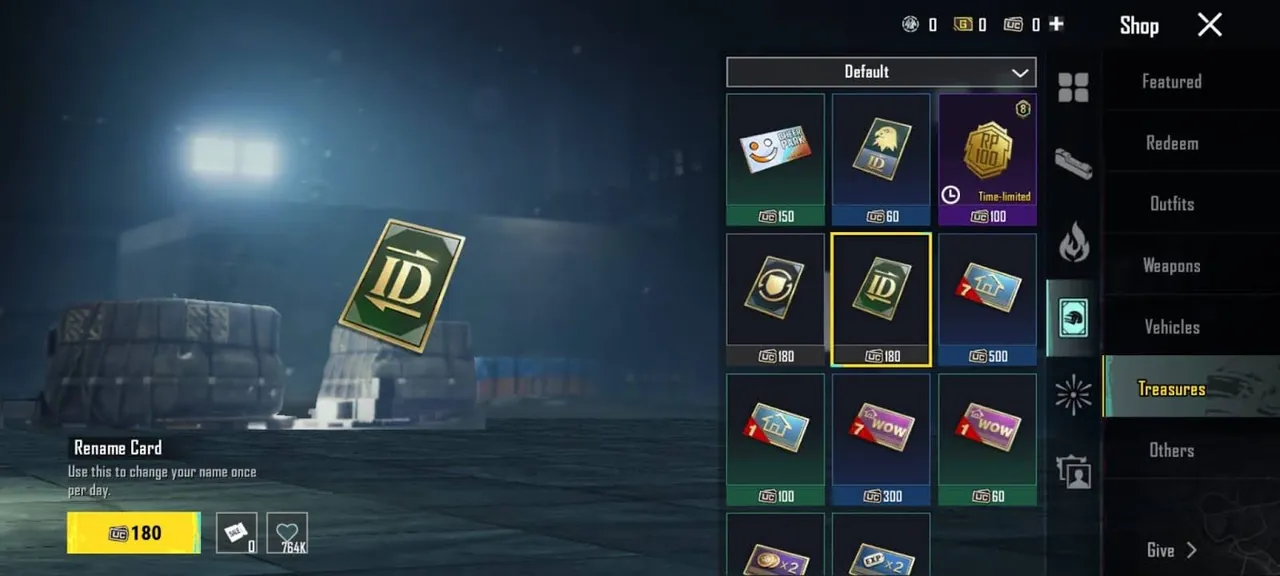
There are a few ways to get a card:
- The free first card. Completing the growth mission at Level 10 gives you your first Rename Card. Check your mail and inventory if you are past Level 10 and have not used it yet.
- Buying one with UC. Extra cards are sold in the shop for 180 UC. If you are deciding whether a rename is worth spending UC on, it helps to know what UC buys and the legit ways to earn it for free.
- Events and rewards. Login events, missions and some seasonal reward tracks occasionally include a Rename Card. These come and go, so check the Events tab now and then.
- Official codes. PUBG Mobile sometimes gives out items, including Rename Cards, through official redeem codes on its own channels. Only use codes from official sources.
Be wary of websites and videos offering unlimited free Rename Cards or free UC. They are not official, and entering your login details on them puts your account at risk.
How to Change Your Name, Step by Step
Once you have a card, the change takes less than a minute.
From your inventory:
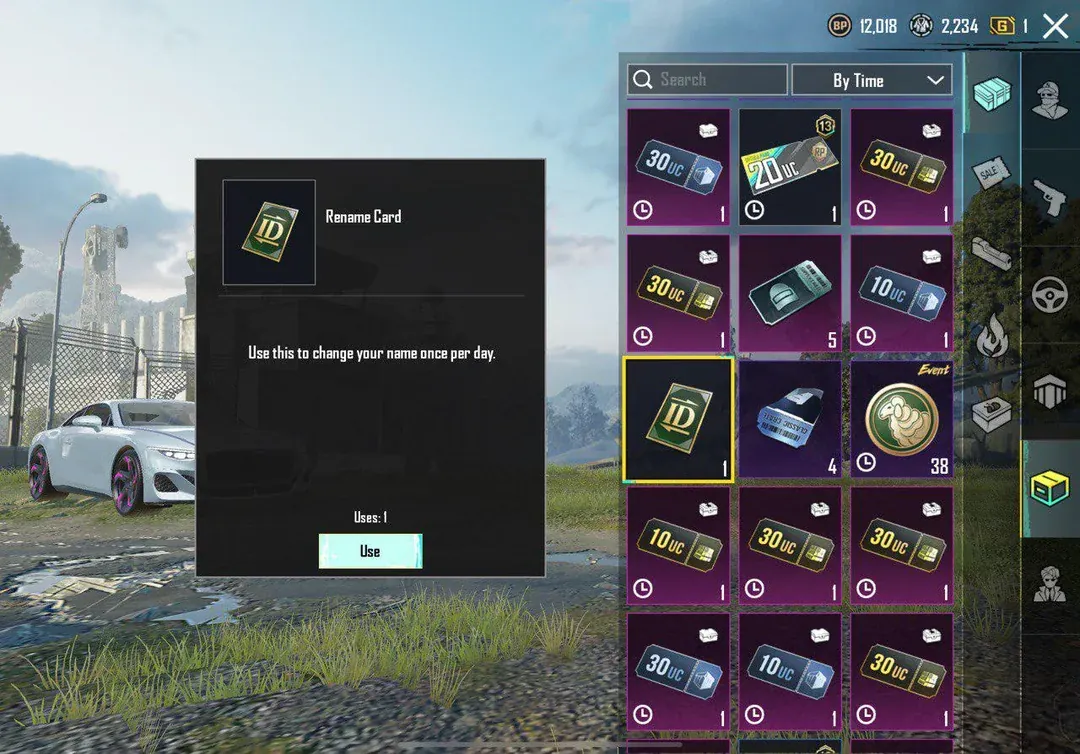
- Open PUBG Mobile and go to Inventory from the main lobby.
- Open the items section, where consumable items are kept.
- Select the Rename Card and tap Use.
- Type your new name and confirm.
From your profile:
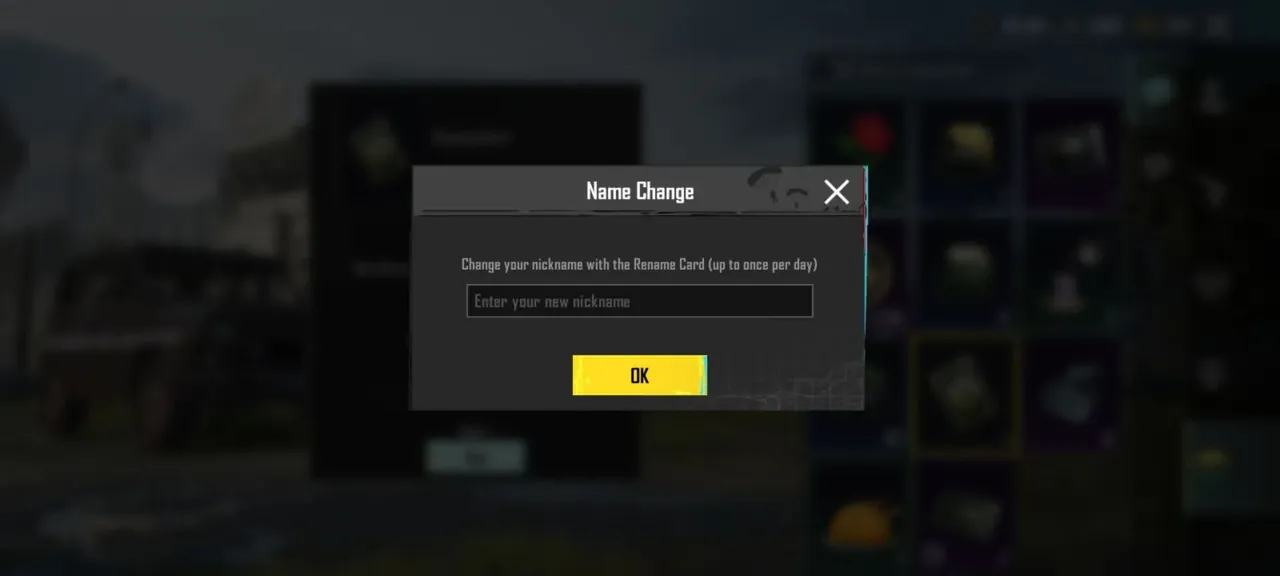
- Tap your profile picture in the top-left corner of the lobby.
- Tap the edit (pencil) icon next to your current name.
- Enter the new name and confirm. The game uses a Rename Card automatically.
If the edit icon is greyed out, you do not have a card in your inventory. Your new name shows up in the lobby, in chat and in match results straight away.
Name Rules and Limits
PUBG Mobile checks every new name before it accepts it. The main rules are:
- Length. Names can be up to 14 characters long.
- Characters. Letters, numbers and many symbols are allowed. Stylish symbols only display properly if the game font supports them; otherwise other players may see empty boxes.
- One change per day. Even with several cards, you can only rename once per day.
- Unique names. Two players cannot hold the same name at once.
- Banned content. Offensive words, and names that pretend to be official staff or well-known players, are rejected.
Your crew or clan tag is shown separately in brackets, so there is no need to type it into the name itself.
Common Errors and How to Fix Them
You may run into one of these messages:
- "Name already exists." Someone else holds that name. Add a number or a symbol, or try a variation.
- "Contains restricted words." Part of the name is filtered. Remove words or letters until you find the flagged part, even if the word looks harmless in your language.
- No Rename Card found. Check your mail as well as your inventory, because some free cards have to be claimed first.
- Boxes instead of characters. Replace those symbols with standard characters that the game font can display.
If you used a card and the change did not go through, restart the game before buying another one. If the card is gone and the name has not changed, contact support through the in-game help centre.
Tips for Picking a Name
Because every change costs a card, it pays to plan ahead:
- Test stylish symbols in the game's chat before using them in a name, to make sure they display.
- Keep it readable. Teammates call out names in voice chat, and a name nobody can pronounce is hard to coordinate with.
- Avoid personal details such as your real name, birthday or phone number.
- Think long term. A name that fits your clan, your rank goals or your content tends to last longer than a joke you will want to change next week.
Names also follow you into ranked play and leaderboards, where a clean, recognisable name helps most as you climb the tiers each season.
Does a Name Change Affect Anything Else?
No. Your account ID stays the same, so friends can still find you, and teammates who already added you keep you on their friends list under the new name. Your stats, rank and items are untouched.
If you would rather start fresh than simply rename, you can pick up one of the PUBG Mobile Accounts that already has the collection you want, hand the daily missions and Royale Pass grind to a player through PUBG Mobile Hourly Services, or reach your target tier this season with PUBG Mobile Boosting.
GameMarket.gg is a trusted digital marketplace for everything gaming-related. We serve the gaming community by providing secure access that enhances every gaming journey.